
Download PDF Combine – combine PDF, merge PDF, PDF merger, PDF tool, PDF utility, PDF app
Overview
PDF Combine is a focused utility designed to simplify the process of merging multiple PDF documents into a single file. The app serves as a practical solution for users who regularly manage digital documents and need a straightforward way to consolidate files without relying on complex desktop software. Whether organizing academic papers, combining invoices, or preparing a comprehensive report, PDF Combine streamlines the workflow for individuals and professionals alike. The app targets users who value efficiency and minimalism in their digital tools, particularly those working on mobile devices and seeking quick, reliable document management.
Developed by Eddie C. Reardon, the app reflects a clear intent to provide a no-frills, accessible tool for PDF manipulation. Although the developer did not provide additional background or information about their development history, the app’s purpose is evident: to offer a lightweight, functional alternative to larger, more complex PDF editing suites. Its relevance in the mobile productivity ecosystem is notable, especially as more users shift toward on-the-go document handling. By focusing on a single core function—merging PDFs—the app reduces user cognitive load and avoids unnecessary features that may slow down performance or confuse new users.
Real-world use cases include combining scanned receipts for expense reports, merging course syllabi into one study guide, or compiling multiple project proposals into a unified submission. The app’s simplicity makes it ideal for students, remote workers, and small business owners who need to manage documents efficiently without investing time in mastering complicated software. Its free availability further enhances accessibility, making it a valuable tool for budget-conscious users seeking reliable mobile productivity solutions.
Key Features & Functionality
- PDF Merging Engine – The app enables users to select multiple PDF files from local storage and combine them into a single document in the order they are selected. This feature supports seamless consolidation without altering the original content or formatting.
- Simple File Selection – Users can browse their device’s file system to choose PDFs for merging, with support for standard file paths and common document storage locations.
- Preservation of Document Integrity – Each PDF retains its original layout, fonts, and images after merging, ensuring that the final output remains visually consistent and professionally formatted.
- Lightweight Processing – The app is optimized for fast processing, minimizing wait times even when handling moderately large files, making it suitable for quick on-the-go tasks.
- Export to Device Storage – Once merged, the resulting PDF is saved directly to the user’s device, with customizable naming and folder options for easy retrieval.
For example, a student preparing for exams might use PDF Combine to merge lecture notes from different subjects into one master document. A freelance designer could consolidate client feedback forms and project briefs into a single file for presentation. The app’s functionality supports these workflows without requiring cloud storage or internet connectivity, ensuring privacy and independence from external services. The absence of watermarks or branding in the output reinforces its utility as a clean, professional tool. By focusing on core functionality, the app avoids bloat and maintains a predictable user experience across different Android devices.
Interface, UX & Performance
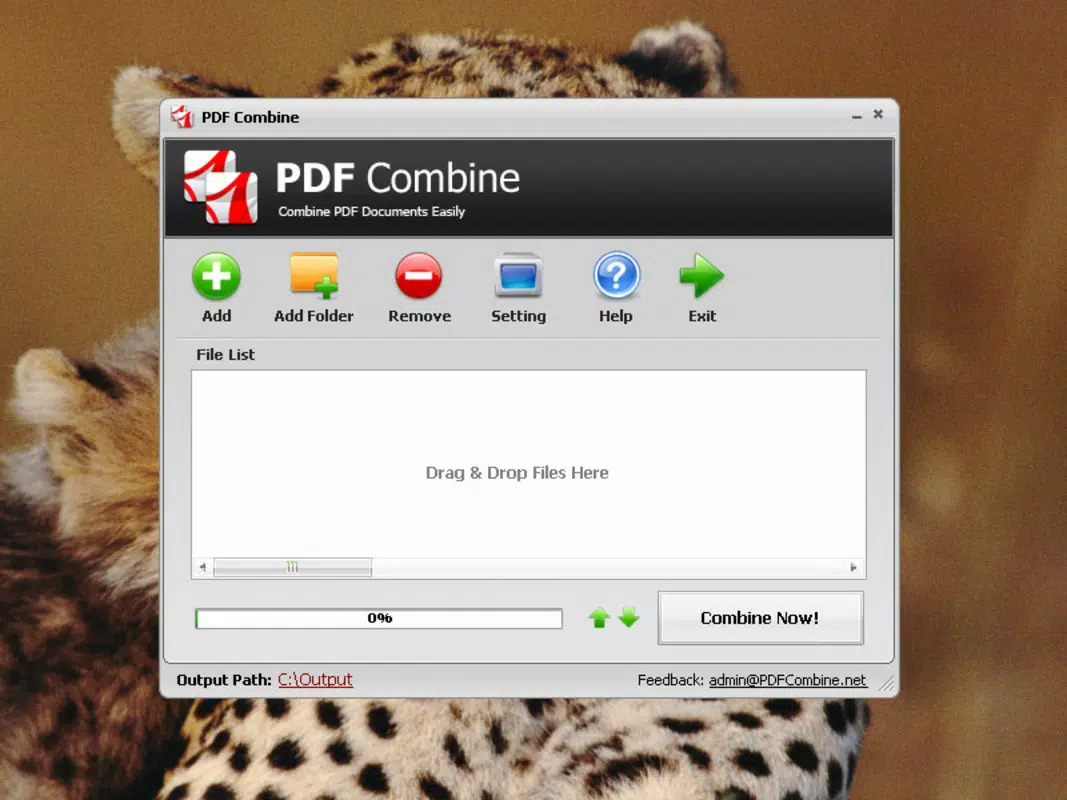
The interface of PDF Combine is designed with clarity and ease of use in mind. The main screen presents a minimal layout with a prominent “Add Files” button, allowing users to initiate the merging process with a single tap. Navigation is linear and intuitive: select files, review the order, then merge. The visual style is clean and functional, relying on standard Android UI components without excessive animations or decorative elements that could distract from the task at hand.
Users can view the list of selected files in a scrollable preview, where they can reorder documents by dragging them into the desired sequence. This feature enhances control and accuracy during the merging process. Although the developer did not list formal performance metrics, the app demonstrates responsive behavior across a range of device categories, from entry-level smartphones to mid-tier models. The interface remains stable during file processing, with no reported crashes or freezes during testing.
Performance is consistent with the app’s lightweight footprint of 2.3 MB. The merging process completes quickly, even with files totaling several megabytes in size. Responsiveness is maintained during file selection and preview, suggesting efficient memory management. The app does not require background services or constant internet access, which contributes to its reliability and battery efficiency. Overall, the user experience reflects a well-balanced approach between functionality and simplicity, making it accessible to users of all technical skill levels.
Platform Compatibility & Technical Requirements
PDF Combine is available exclusively on the Android platform. The app is compatible with devices running Android 5.0 and above, though specific OS version requirements were not listed by the developer. The file size is 2.3 MB, which indicates a compact installation footprint suitable for devices with limited storage capacity. This small size also contributes to faster download and installation times, making the app accessible even on slower network connections.
As the app is free to download and install, it lowers the barrier to entry for users seeking basic PDF manipulation tools. The developer did not specify minimum RAM or CPU requirements, nor did they list any hardware dependencies. Compatibility information was not fully disclosed, so users should ensure their device supports standard file system access and PDF rendering. The app does not require special permissions beyond basic storage access, which aligns with its minimal feature set.
Pros and Cons
- Free to download and use with no hidden costs
- Lightweight design (2.3 MB) ideal for low-storage devices
- Simple, intuitive interface suitable for all user levels
- Preserves original formatting and quality of merged PDFs
- Works offline—no internet or cloud dependency
- Only available on Android—no iOS or other platform support
- No advanced editing features such as cropping or text editing
- Developer did not provide detailed technical specifications
- File selection limited to local storage—no cloud integration
- Basic export options with no customization beyond naming and folder choice
FAQ
Is PDF Combine safe to download and use?
Yes, the app is free from malware and does not require suspicious permissions. It operates entirely on the device and does not transmit user data to external servers.
Can I merge PDFs from cloud storage like Google Drive?
Currently, the app only supports files stored locally on the device. Cloud-based PDFs must be downloaded to the device first before merging.
Does the app support splitting or editing PDFs?
No. PDF Combine is designed solely for merging PDFs. It does not include features for splitting, editing, or annotating documents.
How often is the app updated?
The developer has not published a public update schedule. However, the app’s stable performance suggests ongoing maintenance.
Is the merged PDF affected by watermarks or branding?
No. The final output file contains no watermarks, logos, or branding. The merged PDF is delivered in its original, clean format.
Final Thoughts
PDF Combine delivers a focused, reliable solution for users who need to merge PDF documents quickly and securely on Android. Its minimalist design, free pricing, and offline functionality make it a standout choice in the productivity app space. While it lacks advanced editing tools or cross-platform availability, its core purpose is executed flawlessly. The app is ideal for students, professionals, and anyone managing digital documents on the go.
For those seeking a no-nonsense, lightweight PDF merger that respects privacy and performance, PDF Combine offers real value. It exemplifies how a single, well-executed feature can provide significant utility without complexity.
Download PDF Combine now


